

Aug 20 to Aug 26, 2026
Export your week, month or year as a printable PDF
Preview it at real paper size, then save it. Plus a wall-calendar layout for your Year view.
Export your calendar as a PDF
Print it, pin it up or send it to someone, straight from Settings.
- Pick what to print. Choose a week, a month or a whole year, then the period and the paper size. Tap Export PDF in Settings to start.
- See it before you save it. A live preview shows the page at real paper size. You can zoom in and drag it around, and it updates as you change anything.
- The PDF matches the preview. What you see on the page is exactly what you get. If a busy year is cut off, a note tells you, and a smaller text size or bigger paper fixes it.
- Always light. The PDF is light even if you use dark mode.
Choose what goes on the page
Include only the calendars and details you want.
- Choose your calendars. Tick the calendars to include, or use All and None to switch them all at once. This does not change which calendars you see in the app.
- Make it yours. Change the text size, and show or hide day photos and the calendar legend.
- Itineraries. Include or leave out events inside itineraries.
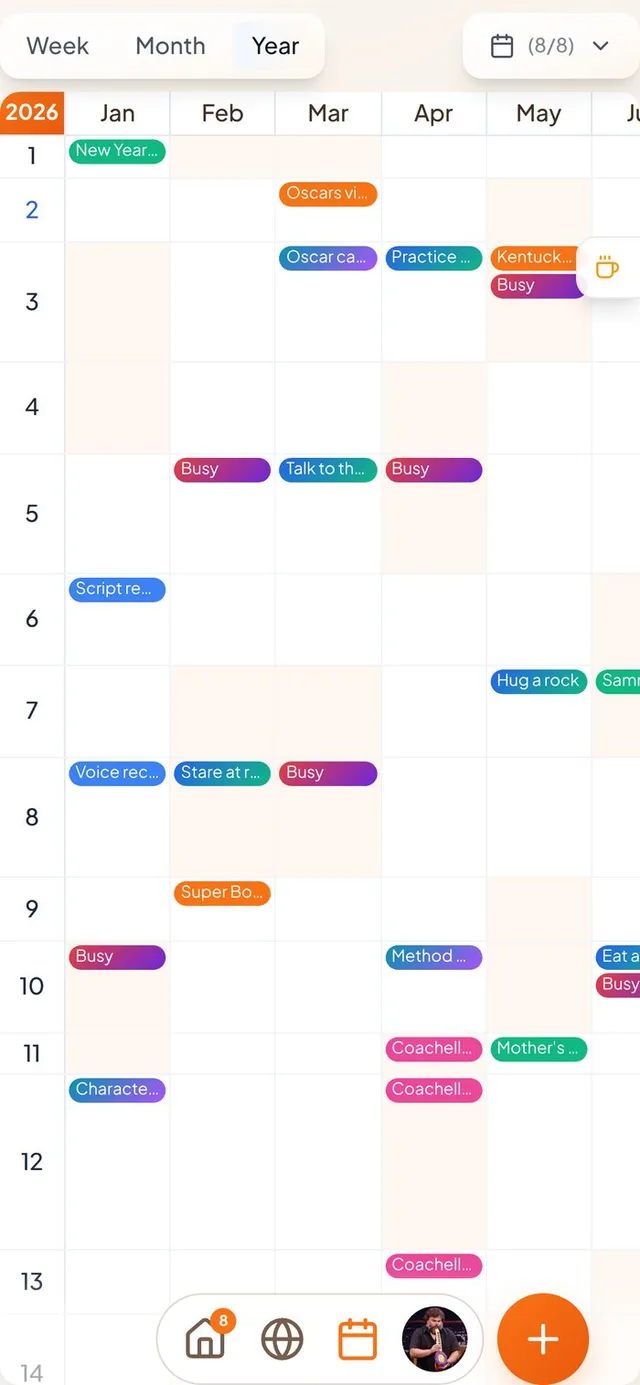
A wall-calendar view of your year
Days 1 to 31 down the side, months across the top.
- Turn it on in Preferences. Switch on “Year view: day rows” and the Year tab shows your whole year on one grid. It is off by default, so nothing changes until you choose it.
- Tap the corner to jump to today. The year badge in the top corner takes you to the current year and centers today. It works in both year views.
- Room to scroll. The last rows now scroll clear of the bottom bar on phones, and the badge has its orange color back.
Invites that don't look broken
Guests were sometimes told a good invite was gone.
- A bad connection is not a dead link. If an invite or itinerary page fails to load, guests now see a message with a way to try again, instead of being told the invite was removed.
- A friendlier page for cut-off links. Long links that get split in a text message now land on a Conmigo page that says the link may be incomplete and suggests asking for a fresh one.
- Friend requests. Tapping a notification about a friend request or an accepted request opens your calendar instead of an error page.
- Event invites. Tapping an event invite notification opens the event.
Smaller improvements
A few more fixes.
- Cover photos for new events are now a setting in Preferences, and they are off by default.
- Buttons, checkboxes and switches use Conmigo orange again instead of a salmon pink.
- Meeting time suggestions are more accurate when daylight saving changes or when you are in another time zone.