

July 30 to Aug 5, 2026
Press and drag to move or duplicate events
Hold an event, drop it on a new day or time, or on Delete or Duplicate. Plus a free first calendar.
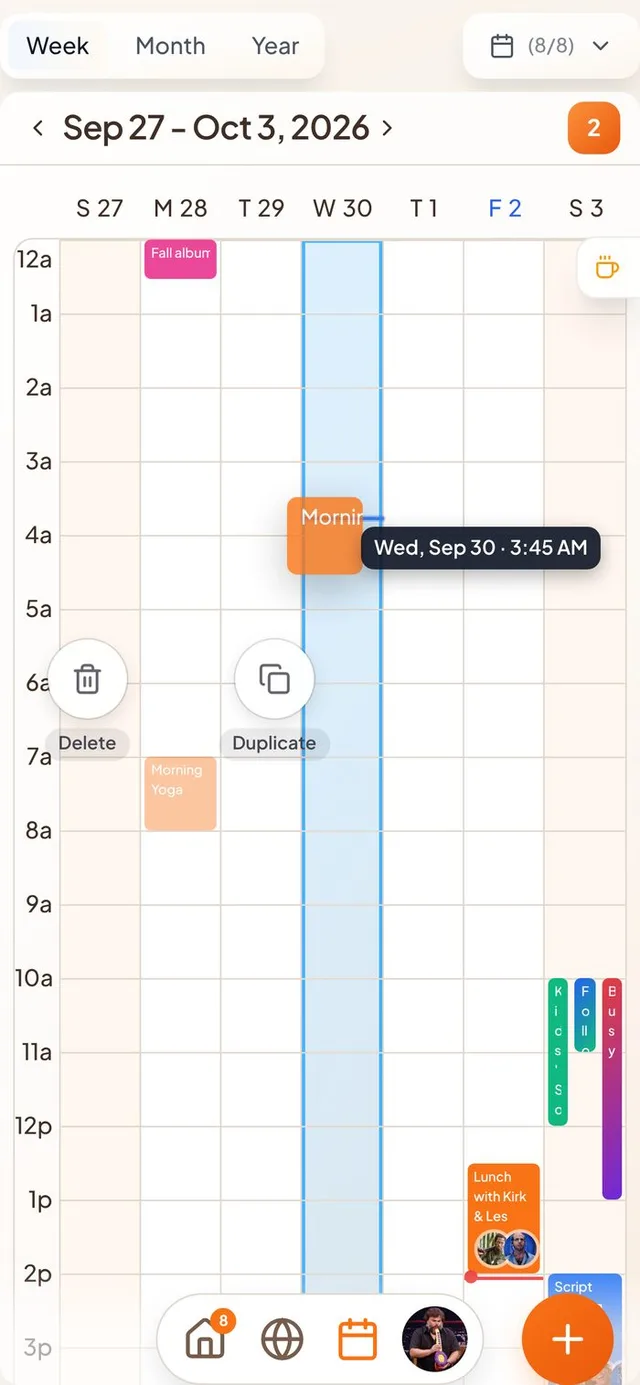
Move events by dragging
Rescheduling no longer means opening the event and editing the time.
- Press, hold and drag. Hold an event in your calendar until it lifts, then drag it to a new day or time. A label shows exactly where it will land.
- Delete and Duplicate circles. While you drag, a Delete circle and a Duplicate circle appear above the event. Drop on one to use it. Hold over Duplicate for a moment, then place the copy where you want it.
- Undo. After a move, “Event moved” appears with an Undo button. Moving the same event several times in a row never puts it back in the wrong place.
- Repeating events. Events that repeat from your Apple calendar can be dragged to a new day or time too.
- Itineraries stay together. A trip can't be moved or shrunk so that the events inside it fall outside its dates. Moves that would break it are refused instead of saving quietly.
One free calendar, more with a purchase
Your first connected calendar is free, and each extra one needs a slot you buy.
- At sign-up. The connect buttons for Google, Microsoft and Apple in the welcome screens follow the same rule. When you need another slot, checkout opens right there and your connection continues after you pay.
- Slots unlock on their own. If you closed the app before a payment finished, opening Settings brings in the slot you paid for.
Faster, steadier edits
Small moments that used to feel slow or risky.
- Duplicate is instant. The copy appears right away. Its form opens ready to edit, and Save says “Saving…” until the copy is stored, so you never end up with two.
- Accept and decline feel immediate. Replying to an invite updates the screen at once. If it can't be sent, the invite goes back to how it was.
- Moves don't overwrite edits. A move you just made is saved before an edit from the event form, so the new times win.
Invite links that find the app
A friend's invite now works even if they don't have Conmigo yet.
- Smart links. An invite link opens Conmigo if you have it, or the App Store if you don't.
- Back to the right place. After a new install, the app takes you to the exact invite, itinerary or friend link you tapped.
- Invite from the map. The Invite button on the Where map waits for your personal link, and tells you if it can't get one.
Smaller improvements
A few more fixes.
- Repeating events show how they end, such as “10 times” or an end date.
- Weekday buttons for repeats are easier to tell apart (Tu and Th, Su and Sa).
- Deleting a repeating event asks whether you mean one event or all of them.
- You can attach pictures to an event.
- Event times follow the right time zone in the calendar.
- Dragging an event no longer causes a blank screen after you drop it.
- Itinerary items can be shared with friends.