

Nov 16 to Nov 22, 2026
Event pages now glow with their cover photo
Every event page takes its colours from its cover, tapping a guest opens the guest list, friends’ open invites show on your calendar, and the Where map shows places your friends loved.
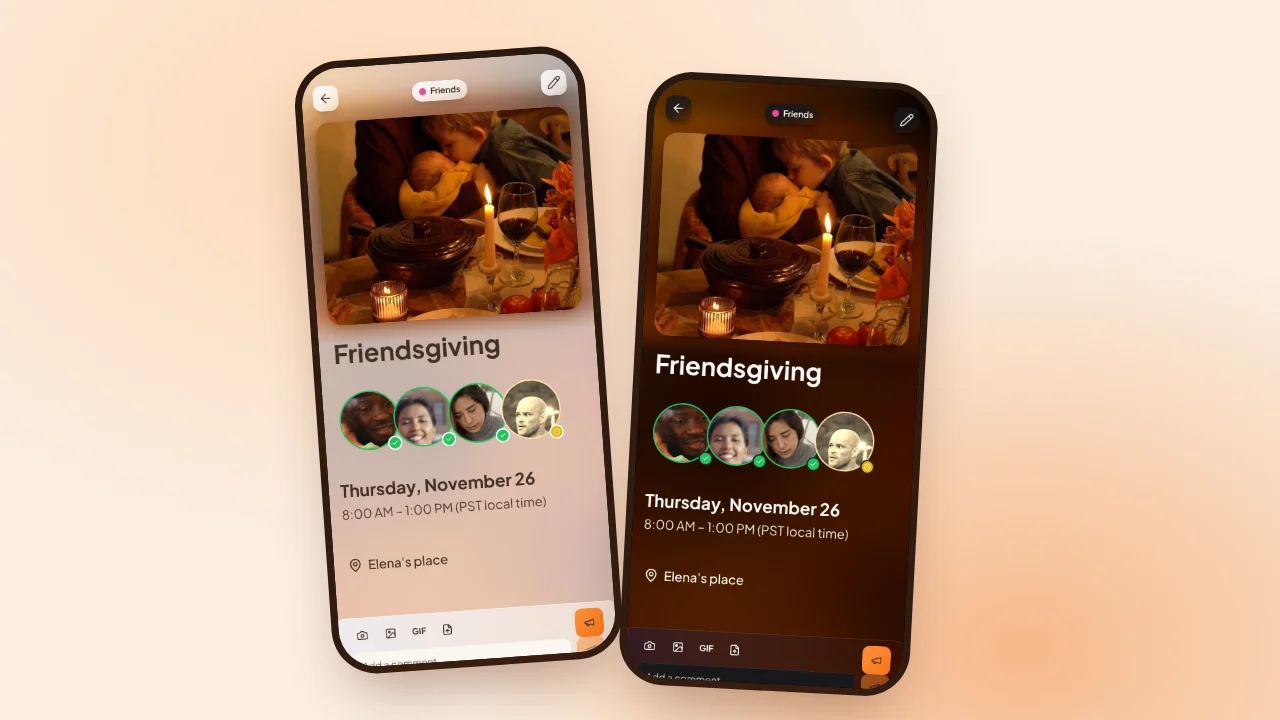
Event pages that look like the event
Open an event and the whole page now feels like it.
- A cover you can see. The cover is now a card with a soft glow of its own colours around it. A row of buttons sits above it, so tapping the pencil no longer makes the picture jump.
- A background that matches. The page picks up the colours of the cover, in light and dark. It’s the same on invite pages and in the event form, where it changes the moment you pick a new cover.
- Tap a face to see who’s coming. Tap any guest to open the Guest List, then tap a person there to open their profile. The old “View all” button is gone.
- Settings in the top bar. An event’s settings now sit as small pills at the top of the page.
- A place you pick shows up right away. Choose a place in the event form and its card appears before you save. A place with no photos shows a small map of the spot, with the same marker as the Where map.
- Pages slide in from the side. On your phone, a saved event opens the way a profile does.
Invite friends in one place
Open invites got easier to use and easier to find.
- Friends’ open invites on your calendar. Open events from friends who’d welcome you now show on your calendar, outlined in their colour. A two-people switch in the Calendars menu shows or hides them.
- One Invites drawer. The + now opens a single drawer with Open invite, your invite link, groups and connections, with a search at the top. People you’re already connected to are left out of the list.
- Open invites without a place. You can let friends know about an open invite even if you haven’t picked where yet.
- Add to Calendar works from invite pages. Guests who tap it now get a real calendar file their phone offers to add.
- Clearer messages. A text blast now says it came from the host, and a blast with photos sends one notification, not one per photo.
Calendars that are easier to tell apart
The Calendars menu got a few small upgrades.
- An emoji for each calendar. Double-tap a calendar’s dot and pick an emoji to sit inside it. It shows in the menu and in the event form.
- An eye for each friend. Under Shared with me, one tap shows or hides all of a friend’s calendars. The switches beside each heading now look and work the same way.
- Holidays show once. If the same holiday came from several calendars, you’ll now see it a single time, on shared calendars, Home and the widget too.
Places, people and times
- Places your friends loved. The Where map shows spots your friends marked as loved, each as its own icon with a heart or a bookmark. You never see who, only that a friend loved it.
- “ish” and “None” for times. Pick an “ish” start when the time is approximate, or “None” when an event has no end. Done now sits in the same corner on every picker.
- Taps act right away. Tapping a day opens it at once, with no wait to see if you meant to double-tap.
- Who search above the keyboard. On a phone, results no longer hide behind the keyboard, and your people list stays put when you’re offline.
A smoother first minute
New accounts get a calmer setup.
- Bigger, clearer screens. Setup has larger titles, fresh wording, and bigger Back and Not now buttons.
- One photo, moving along. The header photo glides from screen to screen instead of reloading, and the finish no longer replays its celebration if you pick up where you left off.
- Fewer dead ends. If you cancel a Google or Outlook sign-in, or don’t share your calendar, Conmigo tells you and brings you back. There’s also a way out of the empty calendar list. The welcome trip is now labelled as an example.
Warmer, calmer and faster
- A warmer look. Dark mode now uses warm near-black with no blue, there’s one shade of orange everywhere, and text sizes are on one scale with nothing too small to read.
- Your people keep their colour. Each person has the same colour on avatars, the map and the widget.
- Quicker to open. Conmigo starts faster, opens events faster, and no longer redraws the whole app when a message pops up.