

Oct 26 to Nov 1, 2026
Taller days in the month, and events that open out of their cards
Pinch the month to see more of each day, tap a card and the event grows out of it, and everything holds its place while it loads.
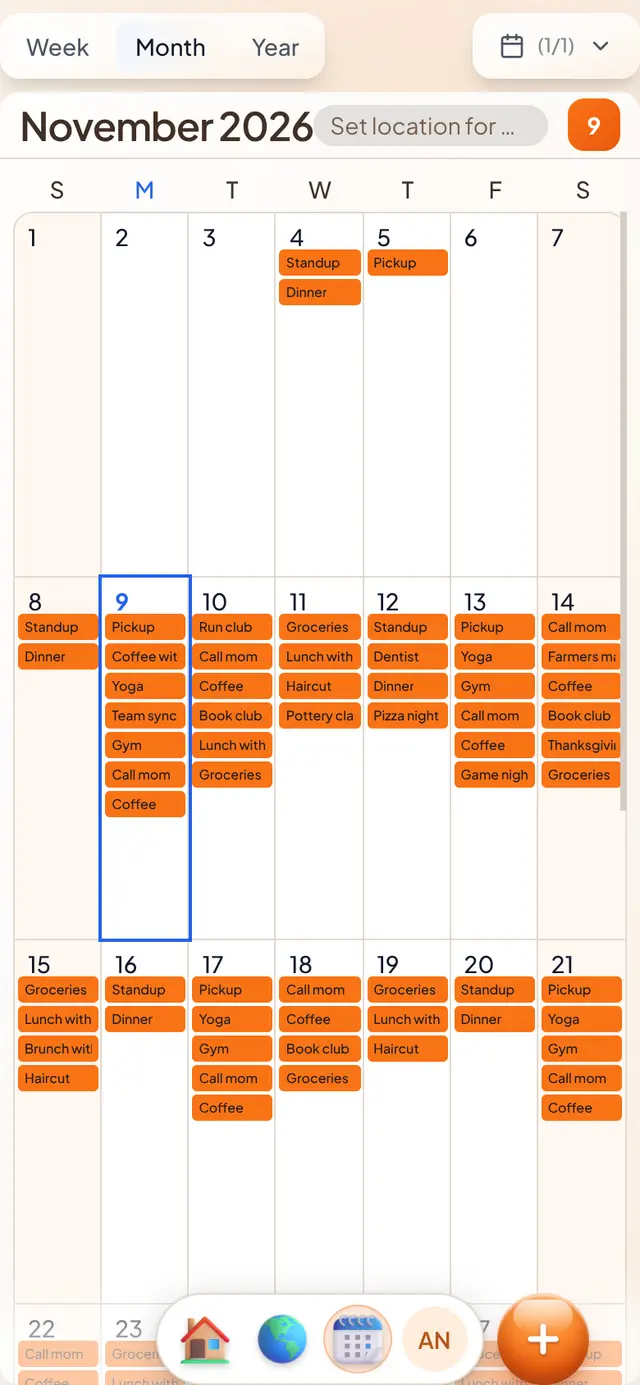
Month view gets taller days
Pinch to see more of each day.
- Pinch up. On a phone, pinch the month for taller days so each day shows more of its events. The shortest size is what the month had before.
- Tap the calendar tab again to reset. The zoom goes back to normal.
- Edges. The year, week and month stop at their edges, and the year pinch shows a picture on phones that cannot keep up.
Events open out of their cards
Tap a card or a map pin and the page grows from it.
- A card that grows into a page. Tapping a Today card, a Friend plans card or a map pin opens the event page out of that card, with the title gliding into place, and it shrinks back when you close it.
- Home opens events in place. No detour through the calendar.
- Gestures write the days in. Opening an event from a calendar gesture puts its days in the title.
Everything holds its place while it loads
Fewer blank flashes.
- Loading placeholders. Home, notifications, the calendar, Settings, sheets, the venue drawer, the event page, profiles and Who now hold their place while they load, and only while something is on its way.
- Profile photos appear sharp sooner. Copies are made when you save a photo, so the first friend to open it no longer waits.
- The new event form opens faster. Its code loads ahead of time.
- Taps land the first time. Hover styles only apply to pointers that hover, and a closing event page lets taps through.
Smarter new events
Titles that mean what you typed.
- A range of days is one all-day event. “Trip to Boston Nov 10 to 11” is now one all-day event across those days.
- The sparkle reads the time right on your phone. It no longer spins when you keep typing, and a day in the past gets no window.
- A name stops being marked once the friend is in Who. No more duplicate highlighting.
- A place typed before dates is kept. The place and the dates both stay in.
Trips and Home
- “Same city” reaches further. The farther apart two friends live, the wider the area that counts, up to about 500 km.
- Home says so when no trips line up. With a way to plan one.
- “All caught up” on the page. Its confetti falls behind Your Plans.
- Home cards are simpler. The date and place row is gone, and Their Plans gets a countdown badge.
Where and smaller improvements
- Where edge zoom. Twice the zoom for the same finger travel, it can’t get stuck, and the side menu sits one button higher.
- Neighbourhood names. Friends’ places can show a neighbourhood name.
- The terms credit Geoapify and OpenStreetMap.
- The venue sheet’s body stays put under your finger while the title scrolls.