

Nov 2 to Nov 8, 2026
Conmigo now fits iPads and the iPhone Duo
Big screens turn freely, nothing hides under the side of the screen, and tapping between tabs feels quicker.
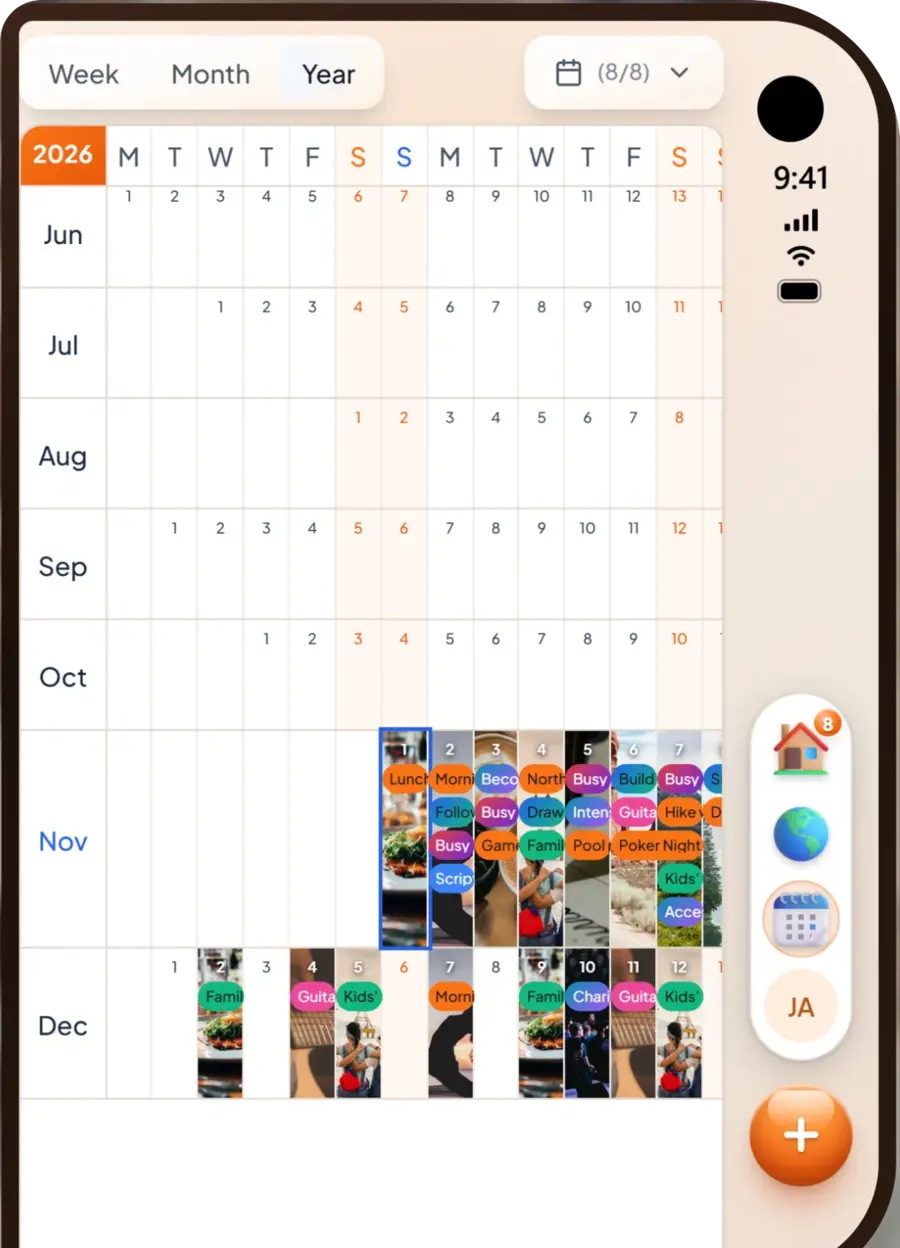
Made for bigger screens
If you use Conmigo on an iPad or an iPhone Duo opened wide, it now behaves like it belongs there.
- Turn it any way you like. On iPads and an iPhone Duo opened flat, every screen now rotates freely instead of staying upright. Regular phones stay upright, as before.
- Your menu moves to the right edge. On the iPhone Duo, the bottom bar becomes a column down the right side, with the orange + at the bottom and your tabs above it.
- Nothing hides under the side of the screen. Buttons, the Saturday column, side menus, dialogs and pop-up menus now stay clear of the area where the time and battery sit.
- Year view fits. Held wide, the year shows every day of every month on one screen, and the Week, Month and Year switcher stays put so you can change views without turning the phone.
- The “+N more” badge no longer covers a title. On a short week, it slides up beside the date number.
Switching tabs feels quicker
Going from Calendar to Home to Where takes less work.
- Tabs you haven’t opened yet get ready in the background. The first visit to each is much quicker than before.
- Tapping a tab no longer redraws the whole app. Only the part that changes updates.
- The Where map holds still when you leave it. It no longer jumps or redraws while the tab slides away.
- Going full screen on the Where map is smooth. On a computer, expanding the map and shrinking it back no longer flashes.
A steadier welcome for new accounts
We tested setup from start to finish and fixed what we found.
- No more restart on the last screen. Tapping Continue on “One last thing” could make the iPhone app restart. It no longer does.
- No flash of “Who are you?” Picking up where you left off opens the right screen straight away.
- Calendar links count. Connecting a calendar link now counts as connecting a calendar during setup.
- A quick double tap can’t skip a screen. The last screen no longer shows “Now go see someone.” under “You’re all set!”
Places and events behave the way you’d expect
Fixes for things that were close, but not quite right.
- The place you pick is the place you get. Choosing an address for “Pizza night” used to swap it for the nearest pizza place. It now keeps the address you chose.
- Default reminders on dragged events. Events made by dragging on the calendar now get your default reminders.
- Reply and react are back on phones. The row under each comment was hidden on touch screens.
- Trip cards include your own contacts. You’ll hear when someone you added by hand lives in a city you’re visiting.
- “Find friends” on Home opens the add-friends sheet. It used to land on the calendar.
- Year view slides. Changing years glides like changing months, and the Today button gives the same tap as the other views.
- Guests already in Who are no longer marked in the event title when you reopen an event.
Your privacy, your choice
More control over what is shared.
- Share usage analytics switch. Turn it off in Settings under Privacy & Location and it stays off on every device you sign in on. A browser that sends Global Privacy Control starts with it off.
- Google Analytics is gone. The privacy notice now names the one analytics tool Conmigo uses.
Smaller improvements
A few more fixes.
- Invite and referral links now show the “A calendar for life, not work” picture when shared.
- New guides on the website compare shared calendar apps and cover couples, families, friends, group trips and finding a time.
- Typing an event title or description no longer slows the rest of the form.